
Hugging Face의 Cache를 다른 경로에 설정정하기


저는 보통 cache_dir다음 세 가지 방법으로 사용자 정의하고 수정합니다.
1. 전역 환경 변수를 설정합니다.
export TRANSFORMERS_CACHE=/path/to/my/cache/directory
2. 코드에서 환경 변수 설정
import os
from transformers import AutoModel
# Set the new cache directory
os.environ["TRANSFORMERS_CACHE"] = "/path/to/my/cache/directory"
# This directory will now be used as the cache
model = AutoModel.from_pretrained("bert-base-uncased")
이 방법은 현재 실행 중인 Python 스크립트에만 영향을 미칩니다.
3. cache_dir매개변수로 전달하기
from transformers import AutoModel, AutoConfig
# Set the cache directory
cache_dir = "/path/to/my/cache/directory"
# Load the model using the specified cache directory
config = AutoConfig.from_pretrained("bert-base-uncased", cache_dir=cache_dir)
model = AutoModel.from_pretrained("bert-base-uncased", config=config, cache_dir=cache_dir)
JavaScript
복사
Cache에 대한 HF의 문서
HF의 모든 Cache 지우기
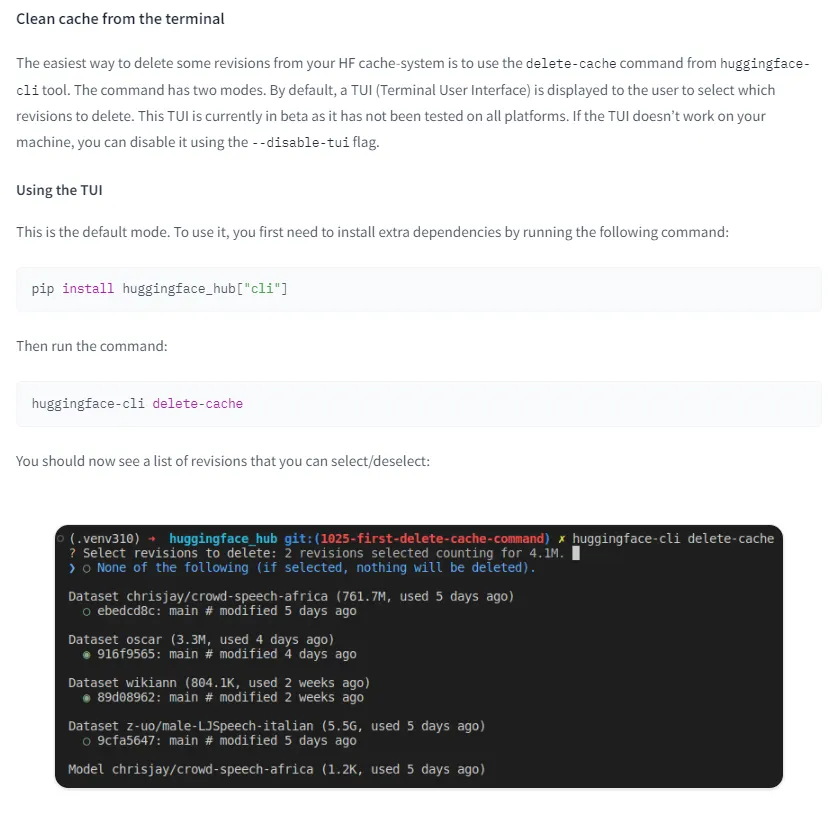
Diffusers에서의 가장 기본적인 코드
코드 초반에 HF의 Cache 경로를 여유가 있는 디스크로 설정하는 부분이 있다.
import torch
from diffusers import StableCascadeDecoderPipeline, StableCascadePriorPipeline
device = "cuda"
num_images_per_prompt = 2
# hf cache 다른 디렉토리 설정
# https://stackoverflow.com/questions/63312859/how-to-change-huggingface-transformers-default-cache-directory
cache_dir = "E:\\ai\\hf_cache"
prior = StableCascadePriorPipeline.from_pretrained("stabilityai/stable-cascade-prior", torch_dtype=torch.bfloat16, cache_dir=cache_dir).to(device)
decoder = StableCascadeDecoderPipeline.from_pretrained("stabilityai/stable-cascade", torch_dtype=torch.float16, cache_dir=cache_dir).to(device)
prompt = "a beautiful portrait of girl, Ghibli style"
negative_prompt = ""
prior_output = prior(
prompt=prompt,
height=2048,
width=2048,
negative_prompt=negative_prompt,
guidance_scale=4.0,
num_images_per_prompt=num_images_per_prompt,
num_inference_steps=20
)
decoder_output = decoder(
image_embeddings=prior_output.image_embeddings.half(),
prompt=prompt,
negative_prompt=negative_prompt,
guidance_scale=0.0,
output_type="pil",
num_inference_steps=10
).images
#Now decoder_output is a list with your PIL images
# save image in local directory
for i, img in enumerate(decoder_output):
img.save(f"output_{i}.png")
# display image
import matplotlib.pyplot as plt
import matplotlib.image as mpimg
img = mpimg.imread('output_0.png')
imgplot = plt.imshow(img)
plt.show()
JavaScript
복사
가상환경 만들어서 requirements대로 모듈 설치하기


# create conda environment
# 아래에서 my_venv는 본인이 원하는 이름으로 자유롭게 수정할 수 있습니다.
conda create --name my_venv --clone base
# activate new environment
conda activate my_venv
# execute .sh file
./requirements.sh
# 만약 requiremenst가 .txt파일 형태로 정리돼 있다면
# pip install -r requirements.txt
JavaScript
복사
Jupyter Note북에서 특정한 Conda 환경을 커널로 불러오려면

#현재 연결되어 있는 jupyter notebook kernel을 먼저 확인하자.
jupyter kernelspec list
#원하는 kernel이 없다면 아래와 같이 추가한다.
# 환경 진입
conda activate <MY_CONDA_ENV_NAME>
# conda kernel package 설치
conda install nb_conda_kernels
# kernel 연결 확인
jupyter kernelspec list
#만약 kernel이 활성화 되어 있는 anaconda env와 연결되지 않았다면 해당 ENV에 jupyter kernel package가 설치되지 않았기 때문일 수 있다. 아래와 같이 설치하자.
# kernel package 설치
pip install ipykernel
# kernel 등록
python -m ipykernel install --user --name <MY_KERNEL_NAME> --display-name "<DISPLAY_NAME>"
Python
복사
Torch가 Cuda를 지원하는지 확인


계속 에러가 났던 부분
경로문제
절대경로를 사용해야 한다.
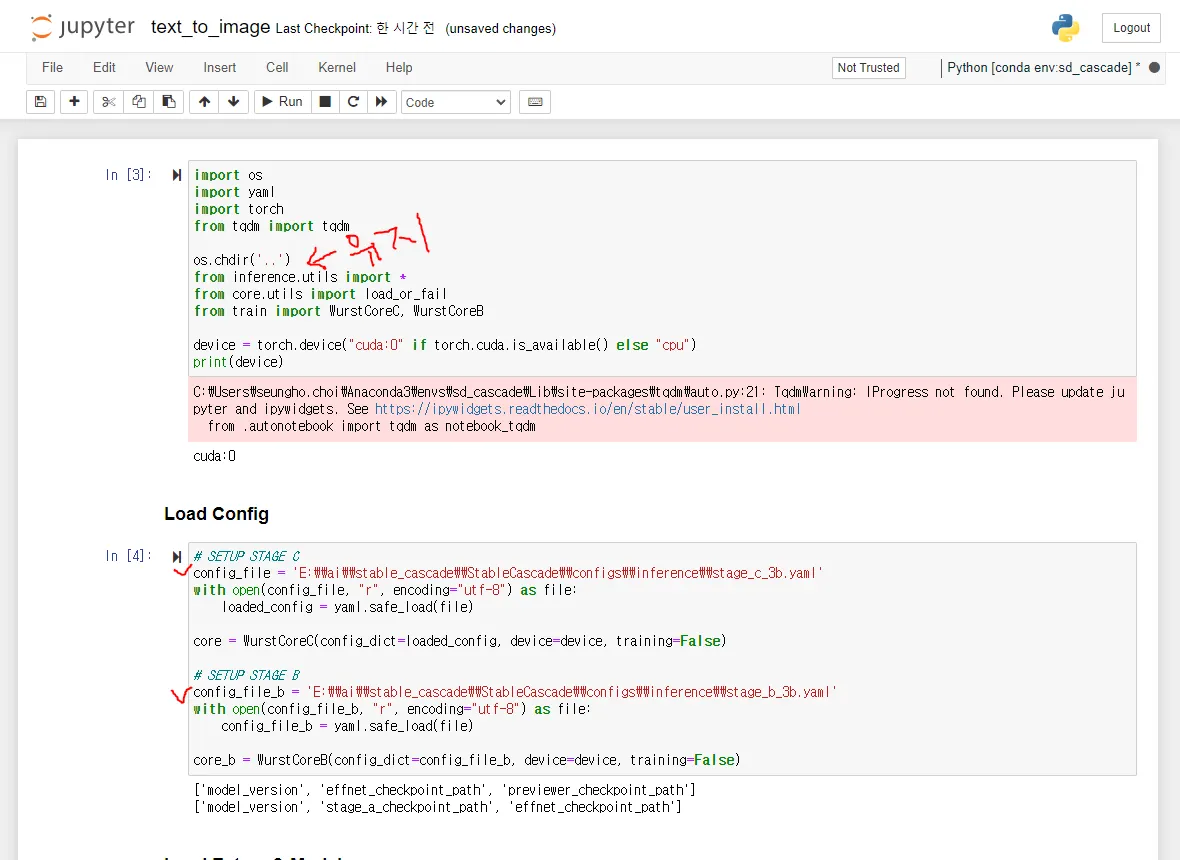
모든 모델을 다운로드 받아야 한다.
download_models.sh에서도 bigbig이 어떤 모델을 다운받는지 알 수 있다.
필요한 것을 다운받으라고 하지만 다 다운로드 받아야 편하다.
#!/bin/bash
# Check if at least two arguments were provided (excluding the optional first one)
if [ $# -lt 2 ]; then
echo "Insufficient arguments provided. At least two arguments are required."
exit 1
fi
# Check for the optional "essential" argument and download the essential models if present
if [ "$1" == "essential" ]; then
echo "Downloading Essential Models (EfficientNet, Stage A, Previewer)"
wget https://huggingface.co/stabilityai/StableWurst/resolve/main/stage_a.safetensors -P . -q --show-progress
wget https://huggingface.co/stabilityai/StableWurst/resolve/main/previewer.safetensors -P . -q --show-progress
wget https://huggingface.co/stabilityai/StableWurst/resolve/main/effnet_encoder.safetensors -P . -q --show-progress
shift # Move the arguments, $2 becomes $1, $3 becomes $2, etc.
fi
# Now, $1 is the second argument due to the potential shift above
second_argument="$1"
binary_decision="${2:-bfloat16}" # Use default or specific binary value if provided
case $second_argument in
big-big)
if [ "$binary_decision" == "bfloat16" ]; then
echo "Downloading Large Stage B & Large Stage C"
wget https://huggingface.co/stabilityai/StableWurst/resolve/main/stage_b_bf16.safetensors -P . -q --show-progress
wget https://huggingface.co/stabilityai/StableWurst/resolve/main/stage_c_bf16.safetensors -P . -q --show-progress
else
wget https://huggingface.co/stabilityai/StableWurst/resolve/main/stage_b.safetensors -P . -q --show-progress
wget https://huggingface.co/stabilityai/StableWurst/resolve/main/stage_c.safetensors -P . -q --show-progress
fi
;;
big-small)
if [ "$binary_decision" == "bfloat16" ]; then
echo "Downloading Large Stage B & Small Stage C (BFloat16)"
wget https://huggingface.co/stabilityai/StableWurst/resolve/main/stage_b_bf16.safetensors -P . -q --show-progress
wget https://huggingface.co/stabilityai/StableWurst/resolve/main/stage_c_lite_bf16.safetensors -P . -q --show-progress
else
echo "Downloading Large Stage B & Small Stage C"
wget https://huggingface.co/stabilityai/StableWurst/resolve/main/stage_b.safetensors -P . -q --show-progress
wget https://huggingface.co/stabilityai/StableWurst/resolve/main/stage_c_lite.safetensors -P . -q --show-progress
fi
;;
small-big)
if [ "$binary_decision" == "bfloat16" ]; then
echo "Downloading Small Stage B & Large Stage C (BFloat16)"
wget https://huggingface.co/stabilityai/StableWurst/resolve/main/stage_b_lite_bf16.safetensors -P . -q --show-progress
wget https://huggingface.co/stabilityai/StableWurst/resolve/main/stage_c_bf16.safetensors -P . -q --show-progress
else
echo "Downloading Small Stage B & Large Stage C"
wget https://huggingface.co/stabilityai/StableWurst/resolve/main/stage_b_lite.safetensors -P . -q --show-progress
wget https://huggingface.co/stabilityai/StableWurst/resolve/main/stage_c.safetensors -P . -q --show-progress
fi
;;
small-small)
if [ "$binary_decision" == "bfloat16" ]; then
echo "Downloading Small Stage B & Small Stage C (BFloat16)"
wget https://huggingface.co/stabilityai/StableWurst/resolve/main/stage_b_lite_bf16.safetensors -P . -q --show-progress
wget https://huggingface.co/stabilityai/StableWurst/resolve/main/stage_c_lite_bf16.safetensors -P . -q --show-progress
else
echo "Downloading Small Stage B & Small Stage C"
wget https://huggingface.co/stabilityai/StableWurst/resolve/main/stage_b_lite.safetensors -P . -q --show-progress
wget https://huggingface.co/stabilityai/StableWurst/resolve/main/stage_c_lite.safetensors -P . -q --show-progress
fi
;;
*)
echo "Invalid second argument. Please provide a valid argument: big-big, big-small, small-big, or small-small."
exit 2
;;
esac
YAML
복사
stage_c_3b.yaml의 yaml에서 확인할 수 있다.
# GLOBAL STUFF
model_version: 3.6B
dtype: bfloat16
# LoRA specific
module_filters: ['.attn']
rank: 4
train_tokens:
# - ['^snail', null] # token starts with "snail" -> "snail" & "snails", don't need to be reinitialized
- ['[fernando]', '^dog</w>'] # custom token [snail], initialize as avg of snail & snails
effnet_checkpoint_path: models/effnet_encoder.safetensors
previewer_checkpoint_path: models/previewer.safetensors
generator_checkpoint_path: models/stage_c_bf16.safetensors
lora_checkpoint_path: models/lora_fernando_10k.safetensors
YAML
복사
t2i 예제에서 속도를 위한 torch.compile 부분은 윈도우에서 문제가 있음.
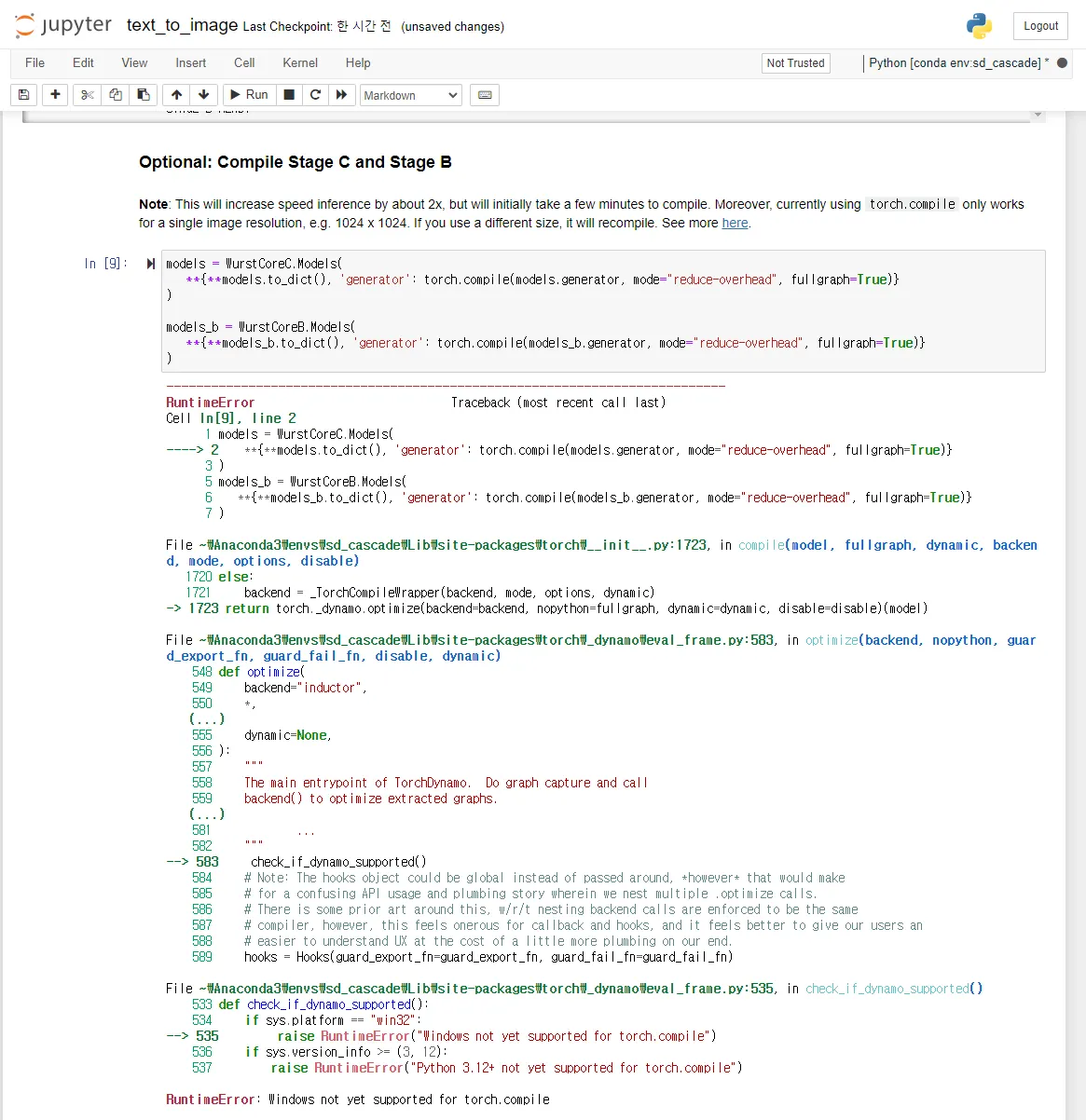
TypeError

controlNet 예제에서 Mask 부분이 문제임.
이렇게 까지 했을 때 제대로 작동하는 것은 t2i 임