개요
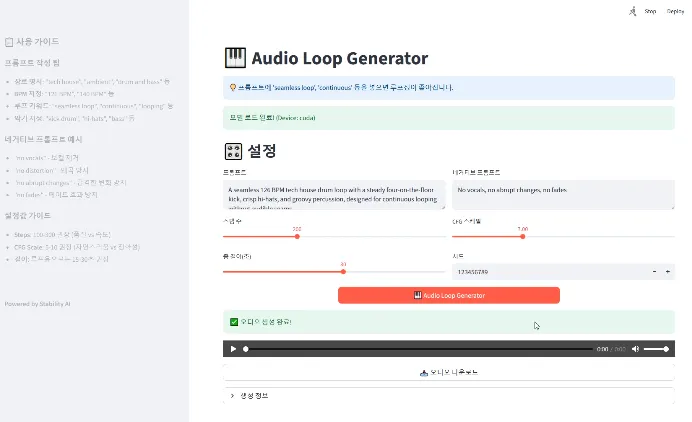
생성 AI로 Audio를 생성하는 하는 것에 대한 테스트, 서비스를 사용하는 것 이외에 Audio를 생성하려고 했을 때 사용할 수 있는 선택지가 많이 없었다. (Suno, Udio서비스에 대한 비공식적인 API들은 있다.) 가장 빠르게 해볼 수 있는 것이 좀 오래되었지만 Stable Audio Open 1.0이 있었고 모델을 빠르게 테스트하기 위해서 UI를 Streamlit으로 작성했다.
Stable Audio Open 1.0은 Stability AI가 개발한 오픈소스 텍스트-오디오 합성 모델로, 텍스트 프롬프트를 기반으로 고품질의 스테레오 오디오를 생성하는 데 최적화되어 있다. 아래는 이 모델에 대한 주요 특징과 세부 사항이다.
주요 특징
•
오디오 생성 능력: 최대 47초 길이의 스테레오 오디오를 44.1kHz 샘플레이트로 생성할 수 있다. 이는 드럼 비트, 악기 리프, 주변 소리, 효과음(Foley recording) 등 다양한 오디오 샘플을 생성하는 데 적합하다.
•
아키텍처: 잠재 확산(Latent Diffusion) 모델을 기반으로 하며, 트랜스포머 아키텍처와 T5 기반 텍스트 임베딩을 통합해 텍스트 조건에 따라 오디오를 생성한다. 이 모델은 오디오 파형을 압축하는 오토인코더와, 그 잠재 공간에서 작동하는 확산 트랜스포머(DiT)를 포함한다.
•
훈련 데이터: Creative Commons 라이선스(CC0, CC-BY, CC-Sampling+) 하에 제공되는 486,492개의 오디오 레코딩(약 7,300시간)으로 훈련되었다. 데이터는 Freesound(472,618개)와 Free Music Archive(FMA, 13,874개)에서 수집되었으며, 저작권 침해 방지를 위해 PANNs 분류기와 Audible Magic의 콘텐츠 감지 서비스를 통해 필터링되었다.
기술적 세부 사항
•
파라미터: 약 12.1억 개의 파라미터를 가지며, 연구와 실험을 위한 기반을 제공한다.
•
훈련 과정: 오토인코더는 5초 길이의 고품질 오디오 조각으로 훈련되었고, DiT는 1,024개의 잠재 토큰(약 47초 오디오에 해당)에 대해 훈련되었다. AdamW 최적화와 학습률 스케줄링이 적용되어 안정성과 성능을 강화했다.
•
평가: AudioCaps(효과음 및 필드 레코딩)와 Song Describer(기악 음악) 데이터셋에서 테스트되었으며, FD_openl3(78.24, 낮을수록 좋음), KL_passt(2.14, 낮을수록 좋음), CLAP 점수(0.29, 높을수록 좋음) 등의 지표로 실력과 프롬프트 관련성을 평가받았다. 음악 생성에서는 Stable Audio보다 약간 뒤지지만, MusicGen(최고의 오픈 모델)보다 약간 나은 성능을 보였다.
용도 및 한계
•
적합한 용도: 연구 및 실험, AI 기반 음악 및 오디오 생성 탐구, 효과음 및 필드 레코딩 생성에 적합하다. 커뮤니티는 이를 미세 조정(Fine-tuning)하여 자신만의 오디오 데이터로 확장할 수 있다.
•
한계: 사실적인 보컬 생성이 어렵고, 비영어 설명이나 모든 음악 스타일/문화에 대해 균등한 성능을 보이지 않는다. 훈련 데이터의 다양성 부족으로 편향이 반영될 수 있다.
오픈소스 및 접근성
•
라이선스: Stable Audio Community License 하에 배포되며, 상업적 용도는 제한된다. 모델 가중치와 훈련 코드는 Hugging Face에서 공개되어 있으며, stable-audio-tools 라이브러리와 함께 사용 가능하다.

•
목표: Stability AI는 이를 통해 AI 오디오 생성의 투명성과 민주화를 촉진하고, 창작자 커뮤니티와 협력하여 책임감 있는 개발을 지향한다.
추가 정보
Stable Audio Open 1.0은 Stable Audio 2.0의 전신으로, 2.0은 최대 3분 길이의 풀 트랙 생성과 오디오-오디오 생성 기능을 추가하며 상업적 사용에 촛점이 맞춰저 있다. 반면, Open 1.0은 오픈 웨이트를 통해 연구자와 예술가들이 자유롭게 탐구할 수 있는 기반을 제공한다. 자세한 기술적 내용은 arXiv 논문(2407.14358)에서 확인할 수 있다.
테스트 코드
가상 환경
conda 환경 설정
conda create -n stable_audio python=3.11
Plain Text
복사
모듈 설치
requirements.txt
# Python 3.11 (set via Conda: conda create -n stable_audio python=3.11)
# Install PyTorch with CUDA 11.8 support via pip:
# pip install torch==2.7.0 torchvision==0.22.0 torchaudio==2.7.0 --index-url https://download.pytorch.org/whl/cu118
# Remaining dependencies installed via pip
diffusers==0.35.0
stable-audio-tools
numpy==2.1.1
transformers
accelerate
safetensors
einops
huggingface_hub
pydub
streamlit==1.38.0
Plain Text
복사
Hugging Face Token 설정
허깅페이스(Hugging Face) 토큰을 CLI(Command Line Interface)를 통해 설정하는 방법은 huggingface_hub 패키지를 사용하여 인증 정보를 구성하는 과정이다. 이를 통해 stabilityai/stable-audio-open-1.0 모델과 같은 gated repository에 접근할 수 있다.
허깅페이스 토큰 설정 방법 (CLI)
1.
허깅페이스 토큰 생성:
•
Hugging Face 계정 설정 페이지로 이동한다.
•
"New token" 버튼을 클릭하고, 토큰 이름(예: stable-audio-access)을 입력한다.
•
권한 설정: "Read" 권한은 기본적으로 필요하며, "Write"나 "Manage" 권한은 필요하지 않으므로 선택하지 않아도 된다.
•
토큰을 생성하면 긴 문자열(예: hf_xxxxxxxxxxxxxxxxxxxxxxxxxxxxxxxx)이 표시되니, 복사하여 안전한 곳에 저장한다. (한 번만 표시되므로 분실 시 재발급 필요)
2.
CLI 로그인 명령어 실행:
•
터미널(또는 명령 프롬프트)을 열고, Conda 환경(stable_audio)을 활성화한다:
conda activate stable_audio
Bash
복사
•
huggingface-cli를 사용하여 토큰을 설정한다:
huggingface-cli login
Bash
복사
•
실행하면 토큰 입력 프롬프트가 나타난다. 복사한 토큰을 붙여넣고 Enter 키를 누른다.
Token: hf_xxxxxxxxxxxxxxxxxxxxxxxxxxxxxxxx
Plain Text
복사
3.
인증 확인:
•
로그인 성공 시, 토큰이 ~/.huggingface/token 파일에 저장된다. 확인하려면:
cat ~/.huggingface/token # Windows의 경우 type %userprofile%\\.huggingface\\token
Bash
복사
•
출력이 복사한 토큰과 일치하면 설정 완료.
4.
환경 변수로 설정 (선택):
•
CLI 외에 코드에서 토큰을 환경 변수로 사용하려면, 시스템 환경 변수에 추가하거나 .env 파일을 활용:
◦
환경 변수 설정 (Windows):
set HF_TOKEN=hf_xxxxxxxxxxxxxxxxxxxxxxxxxxxxxxxx
Bash
복사
◦
.env 파일 생성 (프로젝트 루트에):
HF_TOKEN=hf_xxxxxxxxxxxxxxxxxxxxxxxxxxxxxxxx
Plain Text
복사
◦
Python 코드에서 로드:
from dotenv import load_dotenv
import os
load_dotenv()
HF_TOKEN = os.getenv("HF_TOKEN")
Python
복사
5.
코드 내 토큰 사용 (선택):
•
CLI 대신 코드에서 직접 로그인:
from huggingface_hub import login
login(token="hf_xxxxxxxxxxxxxxxxxxxxxxxxxxxxxxxx")
Python
복사
•
이전 코드(stable_audio_streamlit_ui.py)에서는 HF_TOKEN 변수에 하드코딩되어 있으므로, 위 방법으로 대체 가능.
추가 참고
•
토큰 보안: 토큰은 개인 정보로 취급되며, GitHub과 같은 공개 저장소에 업로드하지 않는다. .gitignore에 .huggingface/를 추가해 보호.
•
문제 해결:
◦
huggingface-cli login이 작동하지 않으면, pip install --upgrade huggingface_hub로 최신 버전 확인.
◦
네트워크 문제(예: 방화벽)가 있다면 프록시 설정 추가:
huggingface-cli login --proxy <http://proxy.example.com>:port
Bash
복사
•
현재 환경 확인:
◦
stable_audio 환경에서 huggingface_hub 설치 여부:
pip show huggingface_hub
Bash
복사
◦
설치 필요 시:
pip install huggingface_hub
Bash
복사
작성한 코드
UI는 Streamlit으로 사용.
실행 : streamlit run stable_audio_test.py
import streamlit as st
from huggingface_hub import login
import torch
import torchaudio
from einops import rearrange
from stable_audio_tools import get_pretrained_model
from stable_audio_tools.inference.generation import generate_diffusion_cond
from pydub import AudioSegment
import numpy as np
import os
import tempfile
import base64
import warnings
# (선택) 해당 경고 숨기기
warnings.filterwarnings(
"ignore",
message="Torchaudio's I/O functions now support per-call backend dispatch"
)
# 페이지 설정
st.set_page_config(
page_title="🎹 Audio Loop Generator",
page_icon="🎵",
layout="wide"
)
# Hugging Face 토큰 설정
HF_TOKEN = " " # 실제 토큰으로 교체
@st.cache_resource
def load_model():
"""모델을 캐시하여 한 번만 로드"""
try:
login(token=HF_TOKEN)
device = "cuda" if torch.cuda.is_available() else "cpu"
model, model_config = get_pretrained_model("stabilityai/stable-audio-open-1.0")
sample_rate = model_config["sample_rate"]
sample_size = model_config["sample_size"]
model = model.to(device)
return model, model_config, device, sample_rate, sample_size
except Exception as e:
return None, None, None, None, None
def make_loopable(audio_path, crossfade_duration_ms=1000):
"""오디오를 루프 가능하도록 크로스페이딩 처리"""
try:
audio = AudioSegment.from_wav(audio_path)
crossfaded = audio.fade_in(crossfade_duration_ms).fade_out(crossfade_duration_ms)
with tempfile.NamedTemporaryFile(suffix=".wav", delete=False) as tmp_file:
loopable_path = tmp_file.name
crossfaded.export(loopable_path, format="wav")
return loopable_path
except Exception:
return None
def enforce_exact_duration_wav(wav_path, seconds_total, microfade_ms=8):
"""
wav_path를 seconds_total(초)로 하드 컷.
클릭 노이즈 방지를 위해 양 끝에 짧은 페이드 인/아웃을 적용.
"""
try:
audio = AudioSegment.from_wav(wav_path)
target_ms = int(float(seconds_total) * 1000)
if len(audio) >= target_ms:
trimmed = audio[:target_ms]
else:
silence = AudioSegment.silent(duration=target_ms - len(audio), frame_rate=audio.frame_rate)
trimmed = audio + silence
# 아주 짧은 페이드
mf = max(0, min(microfade_ms, target_ms // 4))
if mf > 0:
trimmed = trimmed.fade_in(mf).fade_out(mf)
with tempfile.NamedTemporaryFile(suffix=".wav", delete=False) as tmp:
out_path = tmp.name
trimmed.export(out_path, format="wav")
return out_path
except Exception:
return wav_path
def save_wav_with_backend(temp_path, waveform_tensor, sample_rate):
"""
torchaudio.save의 권장 방식(backend 명시)을 사용.
soundfile 백엔드가 없거나 실패하면 자동 폴백.
"""
try:
# 권장: backend 명시 (soundfile)
torchaudio.save(temp_path, waveform_tensor, sample_rate, backend="soundfile")
except Exception:
torchaudio.save(temp_path, waveform_tensor, sample_rate)
def generate_audio(prompt, negative_prompt, steps, cfg_scale, seconds_total, seed, model, model_config, device, sample_rate, sample_size):
"""오디오 생성 함수"""
try:
conditioning = [{
"prompt": prompt,
"negative_prompt": negative_prompt if negative_prompt else None,
"seconds_start": 0,
"seconds_total": int(seconds_total)
}]
with st.spinner("오디오 생성 중..."):
output = generate_diffusion_cond(
model,
steps=int(steps),
cfg_scale=cfg_scale,
conditioning=conditioning,
sample_size=sample_size,
sigma_min=0.3,
sigma_max=500,
sampler_type="dpmpp-3m-sde",
device=device,
seed=int(seed) if seed else 123456789
)
output = rearrange(output, "b d n -> d (b n)")
output = output.to(torch.float32).div(torch.max(torch.abs(output))).clamp(-1, 1).mul(32767).to(torch.int16).cpu()
with tempfile.NamedTemporaryFile(suffix=".wav", delete=False) as tmp_file:
temp_path = tmp_file.name
save_wav_with_backend(temp_path, output, sample_rate)
# 루프 처리
with st.spinner("루프 처리 중..."):
loopable_path = make_loopable(temp_path) or temp_path
# 정밀 트림
with st.spinner("길이 정밀 트림 중..."):
final_path = enforce_exact_duration_wav(loopable_path, seconds_total)
# 임시 파일 정리
for p in [temp_path, loopable_path]:
try:
if p and os.path.exists(p) and p != final_path:
os.unlink(p)
except:
pass
return final_path
except Exception:
return None
def main():
st.title("🎹 Audio Loop Generator")
st.info("💡 프롬프트에 'seamless loop', 'continuous' 등을 넣으면 루프성이 좋아진다.")
model, model_config, device, sample_rate, sample_size = load_model()
if model is None:
st.error("모델 로딩 실패. 새로고침")
return
st.success(f"모델 로드 완료! (Device: {device})")
st.header("🎛️ 설정")
col1, col2 = st.columns(2)
with col1:
prompt = st.text_area(
"프롬프트",
value="A seamless 126 BPM tech house drum loop with a steady four-on-the-floor kick, crisp hi-hats, and groovy percussion, designed for continuous looping without audible seams.",
height=100
)
steps = st.slider("스텝 수", 50, 500, 200, 10)
seconds_total = st.slider("총 길이(초)", 10, 47, 30, 5)
with col2:
negative_prompt = st.text_area("네거티브 프롬프트", value="No vocals, no abrupt changes, no fades", height=100)
cfg_scale = st.slider("CFG 스케일", 1.0, 20.0, 7.0, 0.5)
seed = st.number_input("시드", value=123456789, step=1)
col1, col2, col3 = st.columns([1, 2, 1])
with col2:
generate_button = st.button("🎹 Audio Loop Generator", type="primary", use_container_width=True)
with st.container():
if generate_button and prompt.strip():
output_path = generate_audio(
prompt, negative_prompt, steps, cfg_scale,
seconds_total, seed, model, model_config,
device, sample_rate, sample_size
)
if output_path and os.path.exists(output_path):
st.success("✅ 오디오 생성 완료!")
st.audio(output_path, format="audio/wav")
with open(output_path, "rb") as audio_file:
st.download_button(
label="📥 오디오 다운로드",
data=audio_file.read(),
file_name=f"loop_audio_{seed}.wav",
mime="audio/wav",
use_container_width=True
)
with st.expander("생성 정보"):
st.write(f"Prompt: {prompt}")
st.write(f"Negative: {negative_prompt}")
st.write(f"Steps: {steps}")
st.write(f"CFG Scale: {cfg_scale}")
st.write(f"Seconds: {seconds_total}")
st.write(f"Seed: {seed}")
try:
os.unlink(output_path)
except:
pass
else:
st.warning("⚠️ 프롬프트를 입력")
with st.sidebar:
st.header("📋 사용 가이드")
st.markdown("""
### 프롬프트 작성 팁
- **장르 명시**: "tech house", "ambient", "drum and bass" 등
- **BPM 지정**: "126 BPM", "140 BPM" 등
- **루프 키워드**: "seamless loop", "continuous", "looping" 등
- **악기 지정**: "kick drum", "hi-hats", "bass" 등
### 네거티브 프롬프트 예시
- "no vocals" - 보컬 제거
- "no distortion" - 왜곡 방지
- "no abrupt changes" - 급격한 변화 방지
- "no fades" - 페이드 효과 방지
### 설정값 가이드
- **Steps**: 100-300 권장 (품질 vs 속도)
- **CFG Scale**: 5-10 권장 (자연스러움 vs 정확성)
- **길이**: 루프용으로는 15-30초 권장
""")
st.markdown("---")
st.markdown("**Powered by Stability AI**")
if __name__ == "__main__":
main()
Python
복사
프롬프트 작성 가이드
1.
구체성: 장르(예: 테크노, 재즈, 클래식), 템포(BPM), 악기, 분위기, 리듬을 명확히 기술.
2.
세부 묘사: 분위기를 묘사하는 형용사(예: "활기찬", "우울한", "고양된")와 구조적 요소(예: "루프", "멜로디", "빌드업")를 포함.
3.
컨텍스트: 필요한 경우 환경이나 맥락을 추가(예: "숲 속 분위기", "클럽 분위기").
4.
네거티브 프롬프트: 원치 않는 요소를 피하기 위해 네거티브 프롬프트를 사용(예: "보컬 없음", "왜곡 없음").
5.
길이와 스텝: 출력 길이와 품질을 위해 seconds_total과 steps를 조정(스텝이 많을수록 품질이 좋아지지만 계산 시간이 늘어난다).
다양한 음악 스타일에 맞는 프롬프트 예시
아래는 여러 장르에 맞춘 프롬프트로, 모델이 사실적이고 매력적인 오디오를 생성하도록 했다.
1.
Tech House (Club-Ready Dance Music):
•
Prompt: "A 126 BPM tech house track with a driving four-on-the-floor kick drum, crisp hi-hats, groovy bassline, and subtle synth chords, creating an energetic and hypnotic club vibe."
•
Negative Prompt: "No vocals, no distorted effects."
•
용도: 댄스플로어 루프나 DJ 세트에 적합.
2.
Ambient Electronic (Chill and Atmospheric):
•
Prompt: "A 90 BPM ambient electronic track with lush, warm synth pads, soft arpeggiated melodies, and gentle reverb, evoking a serene, dreamy atmosphere like a starry night in a forest."
•
Negative Prompt: "No aggressive beats, no harsh transitions."
•
용도: 휴식이나 명상용 배경 음악.
3.
Cinematic Orchestral (Epic and Emotional):
•
Prompt: "A 70 BPM cinematic orchestral piece with soaring strings, rich brass swells, delicate piano motifs, and subtle percussion, building an uplifting and emotional climax suitable for a movie soundtrack."
•
Negative Prompt: "No electronic elements, no abrupt changes."
•
용도: 영화 장면이나 예고편에 적합.
4.
Lo-Fi Hip-Hop (Relaxed and Nostalgic):
•
Prompt: "A 92 BPM lo-fi hip-hop beat with warm vinyl crackle, mellow piano chords, a laid-back drum groove, and jazzy basslines, creating a cozy, study-session vibe."
•
Negative Prompt: "No fast tempos, no overly bright sounds."
•
용도: 공부나 휴식 플레이리스트 배경 음악.
5.
Drum and Bass (High-Energy and Complex):
•
Prompt: "A 174 BPM drum and bass track with punchy breakbeats, deep sub-bass, atmospheric pads, and intricate hi-hat patterns, delivering an intense and futuristic rave energy."
•
Negative Prompt: "No vocals, no slow sections."
•
용도: 고에너지 댄스나 게임 사운드트랙.
6.
Acoustic Folk (Warm and Organic):
•
Prompt: "A 100 BPM acoustic folk song with fingerpicked guitar, soft percussion, warm upright bass, and a heartfelt melody, evoking a rustic, campfire storytelling mood."
•
Negative Prompt: "No electric guitars, no synthetic sounds."
•
용도: 소박하고 감성적인 스토리텔링 분위기.
7.
Synthwave (Retro and Futuristic):
•
Prompt: "A 110 BPM synthwave track with pulsing retro synths, gated reverb drums, a driving bassline, and neon-soaked melodies, inspired by 80s sci-fi movie soundtracks."
•
Negative Prompt: "No acoustic instruments, no vocals."
•
용도: 레트로-미래적 비디오나 게임 사운드트랙.